
Publish and Sell Your Digital Media on Stuff.io
Monetize your eBooks, Music, and Videos securely
• Retain 100% ownership of your I.P.
• Simple Revenue split: 70% to you and 30% to Stuff.io/Book – no hidden fees.
• Stuff.io/Book.io handles creation, distribution, and payments to you.
Get Started in 3 Steps
1. Click “Get Started“
2. Fill out the forms
3. Tell Everyone About Your Sale
What Can I Sell?
Stuff.io supports a wide range of digital media, including:
• E-books and documents
• Music and audio
• Video and film
Each piece of content is published as a Digital Asset, meaning it is securely created and distributed with built-in ownership and resale support.
How Distribution Works
• Stuff.io creates and manages your Digital Assets using the exact information you provide
• Assets are distributed on Stuff.io & Book.io for eBooks & Audiobook
• Distribution lasts up to two years from creation or until the asset sells out
• Unsold assets are never created
• Simple Agreement on the next page
Stuff.io may review or reject content that does not meet platform, legal, or compliance standards.
Ownership and Rights
• You keep full ownership of your original content
• No exclusivity, sell your media wherever else you want
Get Paid in Your Local Currency (USD, Euro, etc.)
Primary Sales (New Sales Directly on Stuff.io)
• You receive 70% of net revenue
• Stuff.io retains 30%
Secondary Sales (Sales on Secondary Market Places)
• You choose the resale royalty rate
• Stuff.io receives 2.5% where supported
Net revenue means gross sales minus processing fees, refunds, chargebacks, taxes, discounts, promotions, and blockchain or platform fees.
Payments are paid out on a net 60-day basis to allow for reconciliation and compliance.
How Do I Format The Cover For My Media?
Each mint created can have only one cover.
Book.io/Stuff.io requires that each minted asset include a high-resolution cover image with dimensions of 4000 x 4000 pixels to ensure optimal quality and visual appeal. This 4K resolution standard ensures the cover art is displayed crisply across devices and platforms. You can create a full 4000 x 4000 image or use the Book.io / Stuff.io Photoshop (.psd) files below to add borders and branding to your cover.
Dimensions: 4000 x 4000
File Type: jpg or png
If you have a tall or wide image, such as a standard ebook cover, or prefer Book.io/Stuff.io branding (Borders), please use the Photoshop templates below.
Book.io/Stuff.io Border Photoshop Templates
eBook (Book.io) 2774 x 4000: Photoshop File Download
Audiobook (Book.io) 4000 x 2774:Photoshop File Download
Music Single (Stuff.io):Photoshop File Download
Music Album (Stuff.io): Photoshop File Download
Example:

How do I Format My Music Files?
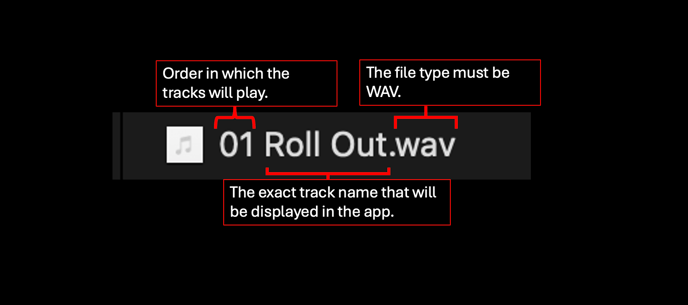
File Type: WAV
Upload: Each track must be uploaded individually; zip files are prohibited.
Example of album file naming:
01 Roll Out.wav
02 Mamma Told Me Not To.wav
03 Eve.wav
04 Babel.wav
05 Gold.wav
06 Wayward Son.wav
07 Eulogy.wav
08 12 Bar Blues Again.wav
09 Devil Aint an Only Child.wav
10 Sonic Tonic.wav
11 Going Down.wav
How Do I Format My Audiobook?
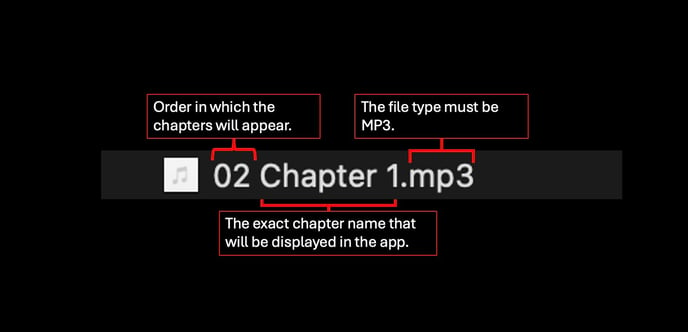
File Type: MP3
File Upload: Each chapter must be uploaded individually. Zip files are not currently compatible.
File Naming: Must look like below
00 Intro.mp3
01 Preface.mp3
02 Chapter 1.mp3
03 Chapter 2.mp3
04 Chapter 3.mp3
05 Chapter 4.mp3
06 Chapter 5.mp3
07 Chapter 6.mp3
08 Chapter 7.mp3
09 Chapter 8.mp3
How Do I Format My eBook?
Currently, the only file type allowed is ePub. However, we accept both flowable and non-flowable ePub types. We will announce other file types in the future.
File Type: ePub
Format: Flowable or Non-Flowable
 English
  Spanish